FROM MP4 FILE TO READABLE TEXT
MP4 to Text Converter
Main guide: Instagram transcript — paste a link, get the full text. This page covers one specific case in depth.
Turn an MP4 into text right here: the file is read in this browser tab, the audio inside it is decoded by the browser itself, and the transcription runs on your device. Nothing is uploaded, there is no signup, and the text is yours to copy or download.
English is what this is tuned for. For other languages, press precise mode after the first pass: slower, but it writes the language that was actually spoken. The model loads on first use, then stays cached.
This does not look like English. The English model answers anyway — it puts English-shaped words over whatever it hears, so non-English audio comes back as invented words. Precise mode loads a larger multilingual model (about 80 MB, once) and is much slower, but it returns the language actually spoken.
The first press downloads about 80 MB. After that the model stays on this device and is not downloaded again — on mobile data, think twice.
Checking whether this device already has it…
Visual guide: MP4 to Text Converter
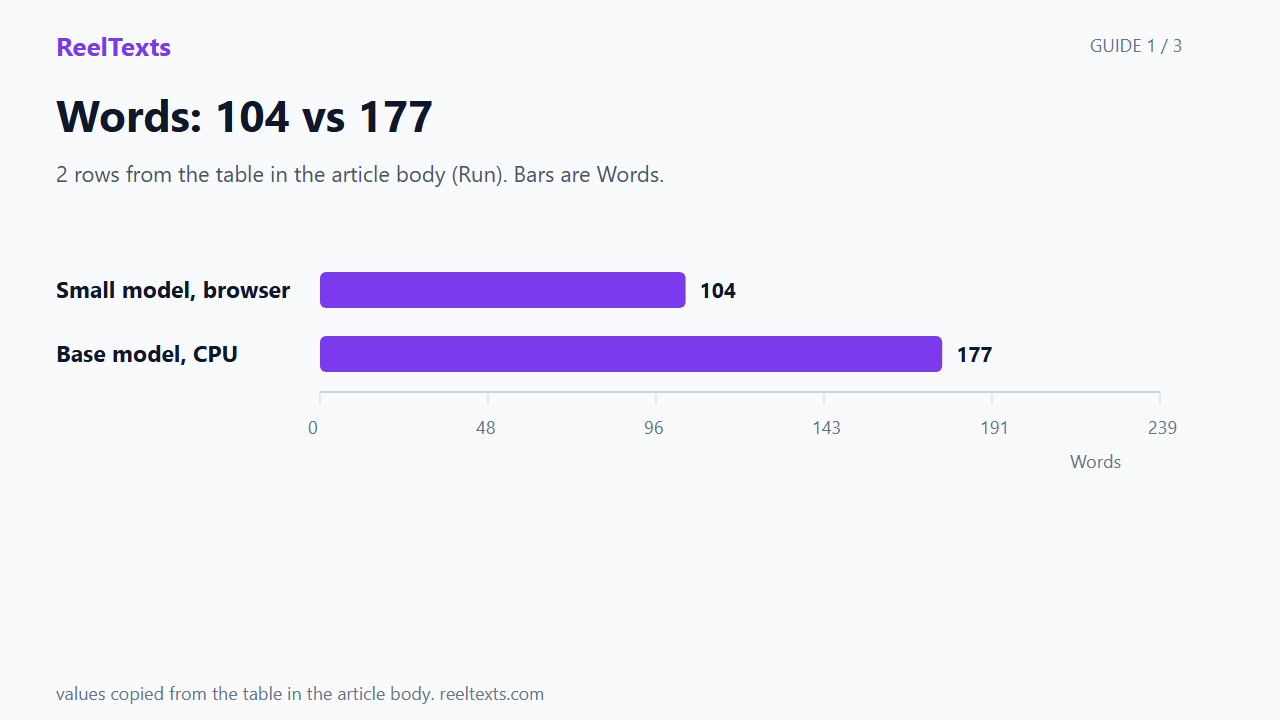
Three slides: 2 rows from the table in the article body (Run). Bars are Words.
Watch the guide
Three slides, thirty seconds, English captions in the player. The video is silent by design; the captions carry the words.
Measured on real files, through the same steps this page runs
Everything below was run through the same code path this page runs: the same file picker, the same browser decoder, the same model. Each result says what the file was, how big, how long, and on what machine — a 4 GB Windows laptop running Chrome 156. Nothing here is rounded up or estimated.
A 49-second MP4 became 104 words in 40.2 seconds
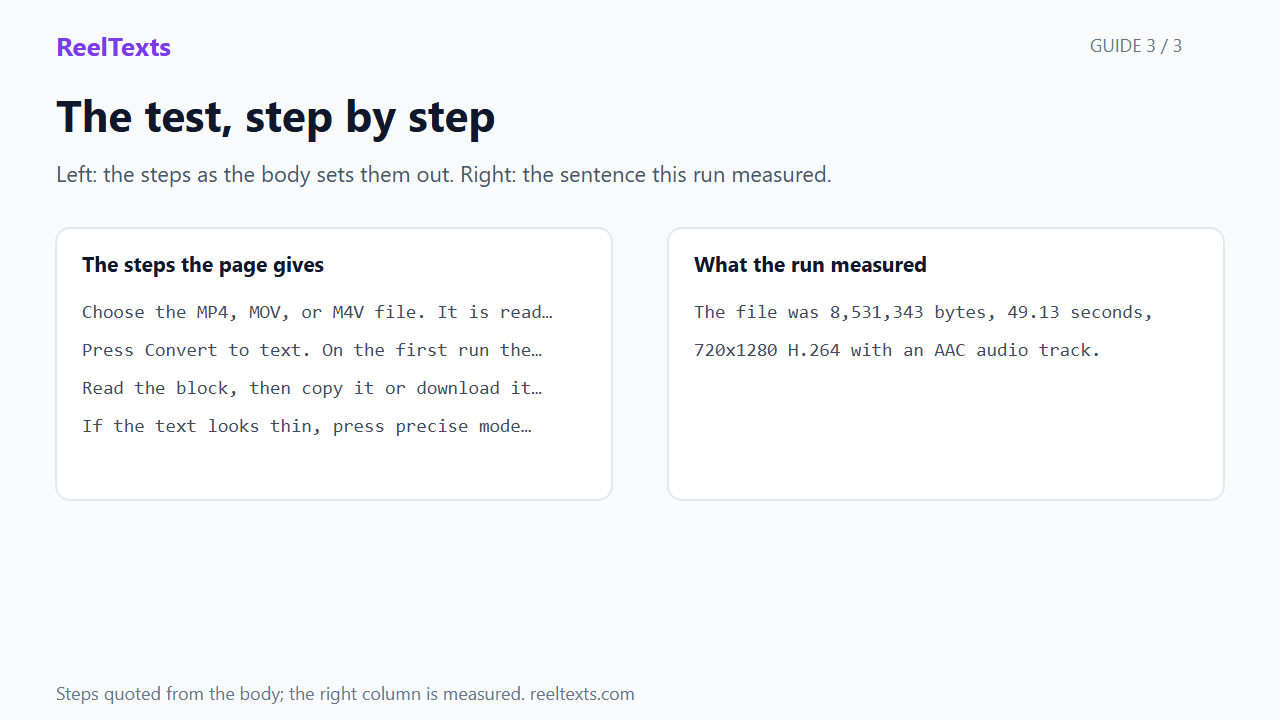
The file was 8,531,343 bytes, 49.13 seconds, 720×1280 H.264 with an AAC audio track. In a browser tab on that machine, with the model already downloaded, it took 40.2 seconds from pressing the button to text on screen — 2.9 seconds to bring the model up, 35.5 to transcribe. The opening came back as: If health advice has never confused you, just keeps scrolling.
The same file through the larger model returned 177 words, not 104
The default English model is the small one — that is why it finishes inside a minute. Run the same 49-second file through Whisper base on the same machine’s CPU (int8, two threads) and it returns 177 words in 45.8 seconds, including a stretch of fast speech the small model skipped. Same audio, different model, 71 more words.
| Run | Words | Seconds |
|---|---|---|
| Small model, browser | 104 | 40.2 |
| Base model, CPU | 177 | 45.8 |
An HEVC MP4 from a phone decodes, because the video stream is never touched
A 10-second HEVC file (AAC audio, 733,865 bytes) went through the picker with no error and reached the transcription step. That is not luck: only the audio track is read, so whether this browser can play HEVC video has no bearing on converting it to text.
The size limit was tested at the byte, not copied from a spec
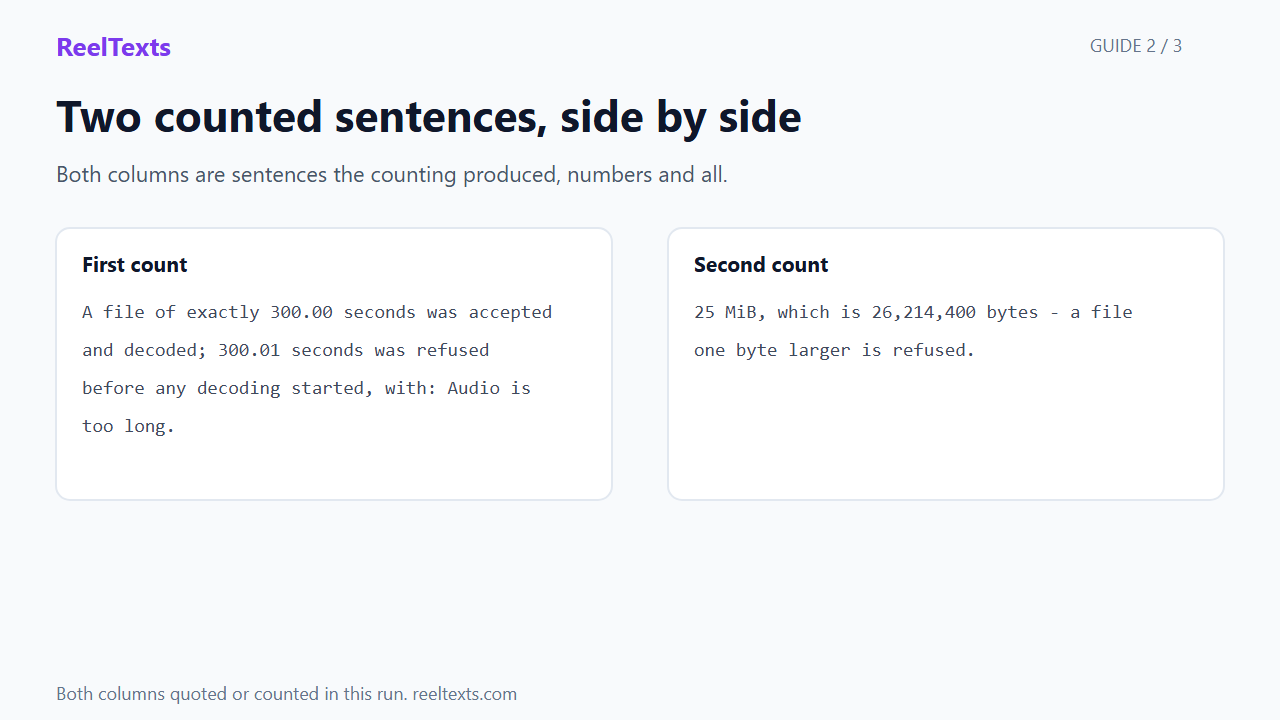
25 MiB is 26,214,400 bytes. A file of exactly that size passed the size check. A file of 26,214,401 bytes was refused with: File too large. Choose a file no larger than 25 MiB.
The duration limit was tested at the second
A file of exactly 300.00 seconds was accepted and decoded; a file reading 300.02 seconds (as ffprobe reports it) was refused before any decoding started, with: Audio is too long. Choose a file no longer than 5 minutes.
Your file is not uploaded, and that is checkable rather than asserted
The picker hands the file to the browser’s own file API. The page reads it with arrayBuffer(), decodes it with the browser’s audio decoder, and the only thing it downloads is the model itself. There is no request anywhere in the page that carries your file, and no account for it to be attached to.
MP4 to transcript: what the text actually is
A transcript here is one block of plain text — no timecodes, no speaker labels, no headings. That is deliberate. An MP4 to transcript conversion is usually wanted for quoting, for subtitling, or for pasting into notes, and a wall of timestamps makes all three harder. You get the words, in the order they were spoken.
MP4 transcription quality depends on the audio, not on the container. A voice recorded close to the phone transcribes well; a music bed under speech does not. The 49-second file above is the honest illustration: the small model returned 104 words and the larger one 177 from identical audio. The gap is not noise — it is a stretch of fast speech the small model did not write down.
How to convert an MP4 to text
- Choose the MP4, MOV, or M4V file. It is read from your disk, not sent anywhere.
- Press Convert to text. On the first run the model downloads once, then stays cached.
- Read the block, then copy it or download it as a
.txtfile. - If the text looks thin, press precise mode and run the same audio again.
Supported formats and limits
MP4 with an audio track is the main path. MOV and M4V files are accepted too when they carry an audio track — they are the same container family, and only the audio inside is read. MP3 and M4A work as well if that is what you have. Audio-only files go through the MP3 to text converter, which runs the same steps.
Limits: 25 MiB (26,214,400 bytes) and 5 minutes (300 seconds), both checked before any decoding starts, both measured above. On typical phone video the byte limit arrives first: 25 MiB spread across five minutes is 699 kbit/s, and phone MP4s usually run at twice that.
FAQ
- How do I convert an MP4 to text here?
- Choose the file, press Convert to text, wait for the model to load on first use, then copy the text or download it as a .txt file. There is nothing to install.
- Is my MP4 uploaded to a server?
- No. The file is read and decoded in this tab, and the only download is the transcription model. Closing the page leaves nothing behind.
- What is the largest MP4 this accepts?
- 25 MiB, which is 26,214,400 bytes — a file one byte larger is refused. Five minutes is the length limit, and both are checked before decoding starts.
- Does it work with HEVC video from an iPhone?
- Yes. An HEVC MP4 was tested here and reached the transcription step without an error, because only the audio track is read and the video is never decoded.
- Can I convert a MOV or M4V file?
- Yes, as long as it has an audio track. Both were tested through this page’s file picker and both decoded.
- Why is the text shorter than the audio I hear?
- The default English model is the small, fast one, and it can skip a stretch of rapid speech. On the 49-second file above it returned 104 words where the larger model returned 177. Precise mode is the fix when the text matters.
- Does the transcript include timestamps?
- No. You get one block of plain text with no timecodes. Timestamps are a separate job, and adding them to every line would make the text harder to quote.
- Is this free?
- Yes — no signup, no quota, no watermark. The transcription runs on your device, so there is no per-file cost to pass on to you.
Have an Instagram link instead of a file?
If what you have is a public Reel rather than something on your disk, use the Instagram transcript generator on the home page: paste the link and the same local transcription runs on the audio it fetches.